
Docebo Enrollment Statuses Explained (and what “subscribed” actually means)
If you have ever pulled a Docebo enrollment report or called the API and found a status called “subscribed,” you are not alone. It does not match anything you see in the Docebo interface, and it has nothing to do with billing.
Here is what each status means and where you will run into it.
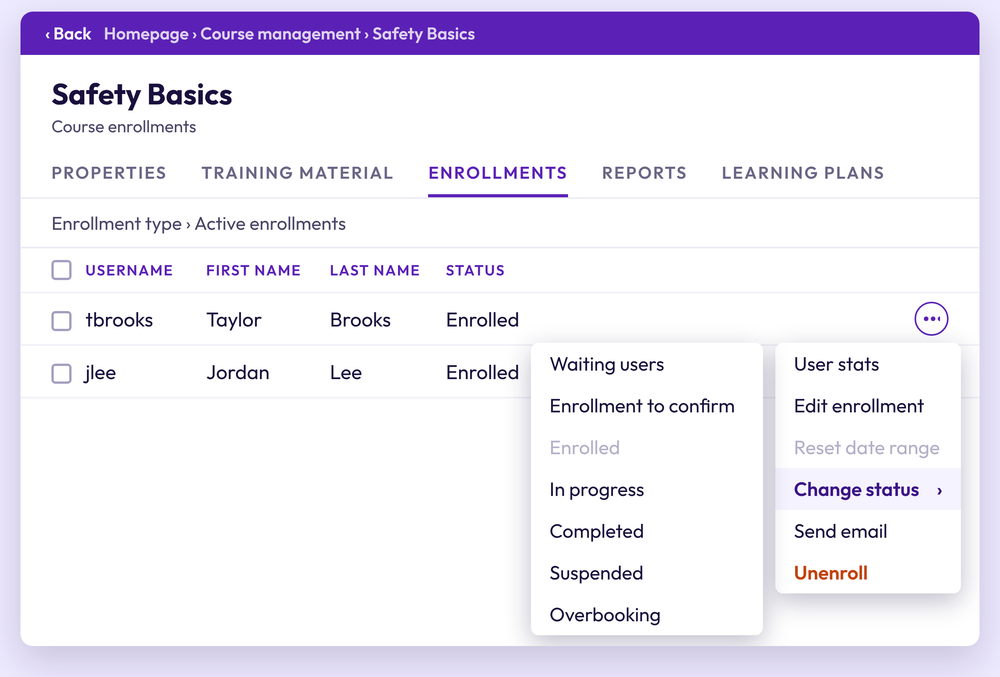
The statuses you see in the Docebo interface
Docebo’s documentation lists these course enrollment statuses:
Enrolled: The learner is enrolled but has not started any training material.
In progress: The learner has started but not finished. In an ILT course, it also covers learners who have attended only some of their sessions.
Completed: For e-learning, all mandatory material is done. For ILT, the learner has completed the number of sessions the course requires.
Waiting users: The learner is on a waiting list and cannot open the course. Common reasons are a full course, an unfinished payment, or an e-learning self-enrollment that needs admin approval.
Enrollment to confirm: The enrollment needs approval before the learner can start.
Suspended: The learner’s access to the course has been paused. A Superadmin or Power User sets this by hand.
Overbooking: The learner was enrolled past the course’s seat limit.
What “subscribed” means
In Docebo Connect, the Get enrollments action returns a Subscribed field inside a Subscription object, next to Is active. Docebo describes it as true if the user is subscribed and false if not. It is a yes or no flag, not a progress status. How far along the learner is shows up in a separate Status field, and Docebo's examples there include not_started and completed.
Docebo's documentation does not define "subscription" in the connector, and it does not say how Subscribed relates to the Enrolled status in the interface, so check it against your own data. One clue: the connector's enrollment filter uses subscription_to_confirm for the status the interface calls Enrollment to confirm. That suggests "subscription" is the API-side word for what the interface calls an enrollment, but Docebo does not say so outright.
Why this trips people up
Reporting often mixes vocabularies. A dashboard built on Connect data may show a "subscribed" true or false column while your admins and managers talk about "enrolled" learners. If you are building a report, a Docebo Connect recipe, or a sync with another system, map the status values explicitly. Do not assume a field name in one place means the same thing as a label in another.
Three mistakes we see with enrollment statuses
Counting not-started learners as activity. A learner who is Enrolled has not opened the course, and a true in the Subscribed field does not say otherwise. Treating them as engaged inflates your numbers.
Filtering out statuses you did not know existed. If your report only looks at subscribed, in_progress, and completed, learners in waiting or approval states disappear from your totals.
Hard-coding status text in automations. If a recipe or script compares against a status string, test it against real API output before you rely on it. Do not assume it from the interface.
Quick checklist before you build a report or automation
Pull a small sample of real enrollment records and look at the raw status values.
Write down which interface label each value maps to.
Decide how you want to treat the waiting, approval, suspended, and overbooked states.
Keep that mapping somewhere your whole admin team can find it.
Need help with enrollment reporting or Connect recipes?
Umbra Learning works with Docebo admin teams on integrations, automation, and platform optimization. If your enrollment data does not line up between Docebo and your other systems, we can help you sort it out. Contact us at umbralearning.com.
